Understanding Linux Process UIDs: Real, Effective, Saved, and Filesystem
Introduction to Standard UNIX Access Control
-
Access to file and operation is determined by User UID or user's membership Group ID
-
Objects (file, directory, process) have owner, Owners have board control over their objects
-
You own the object you create.
-
The
root(UID 0) can act as the owner of any object. -
Only the
rootcan perform certain sensitive administrative operations.-
Creating device file
-
Setting the system clock
-
Rasing resource usage limits and process priorities
-
Setting the system's hostname
-
Configuring network interface
-
Opening privilaged network ports (thos numbered below 1024)
-
Shutting down the system
-
These Identities are stored in:
- User ID are mapped in
/etc/passwd - Group ID are mapped in
/etc/group
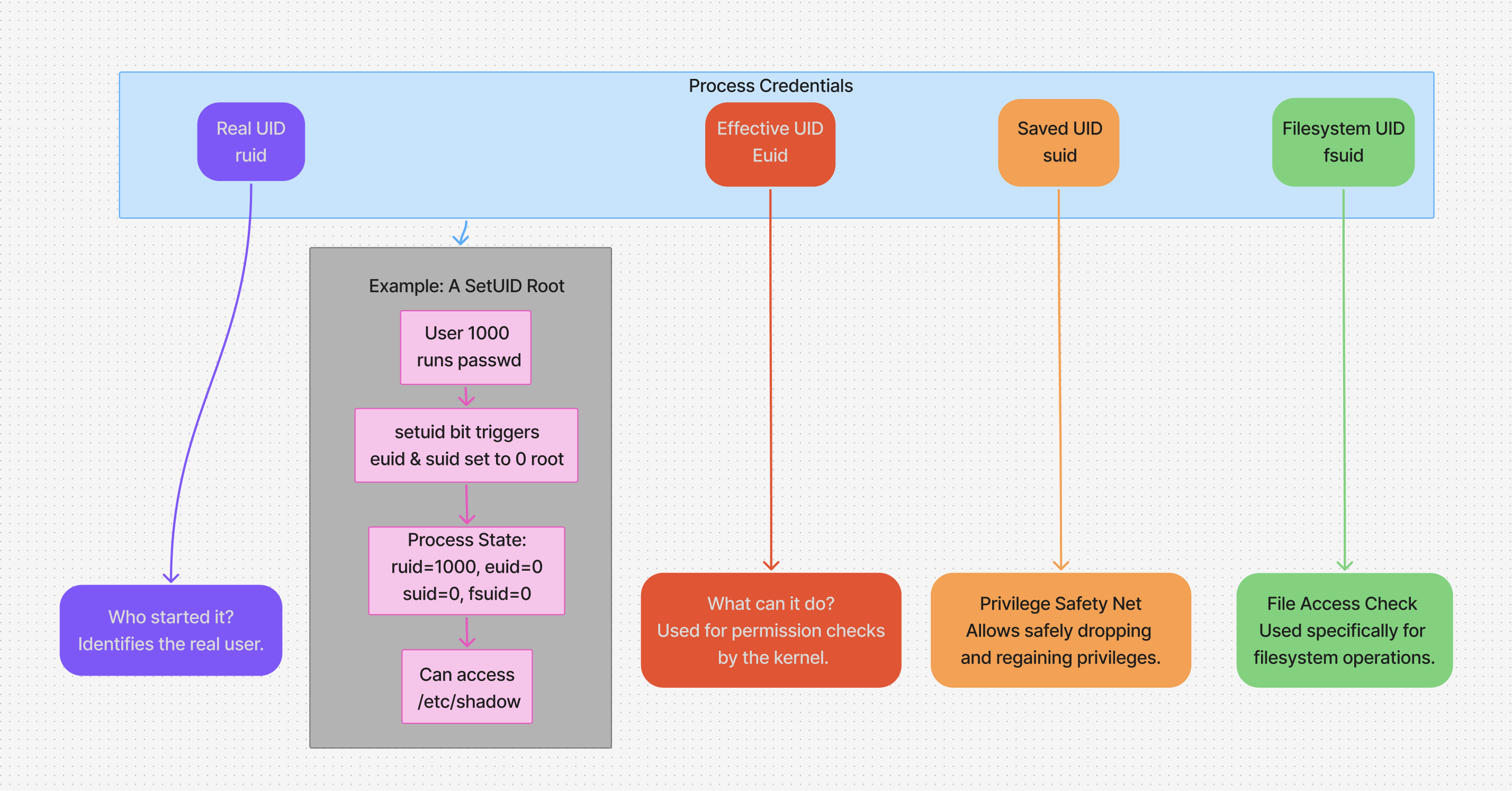
The Four User IDs of a Linux Process
Process ownership: A process runs under specific **User Identity **, Which determine what files it can acess and what actions it can perform. Precess can have multiple identities:
- Raal, effective, save UID
- Real, effective, save GID
- It determines what the process is allowed to do , including:
- What file it can access
- What system calls it can make.
- What capabilities it has.
Breakdown of UIDs
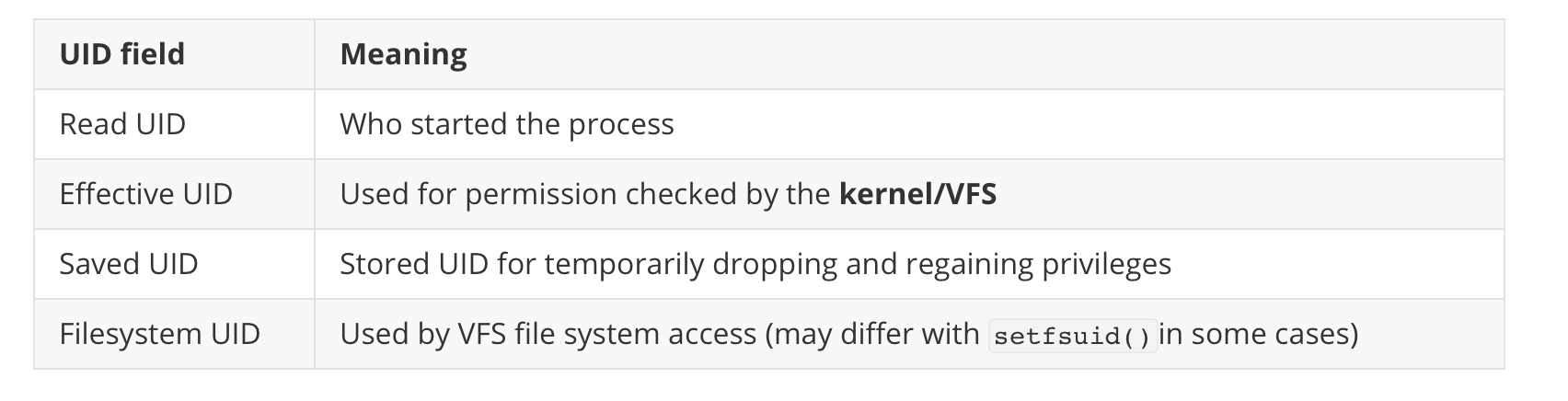
- This UID is stored in the
credstructure (current->srec->uid) of the process.
A Practical Example: The Nginx Web Server
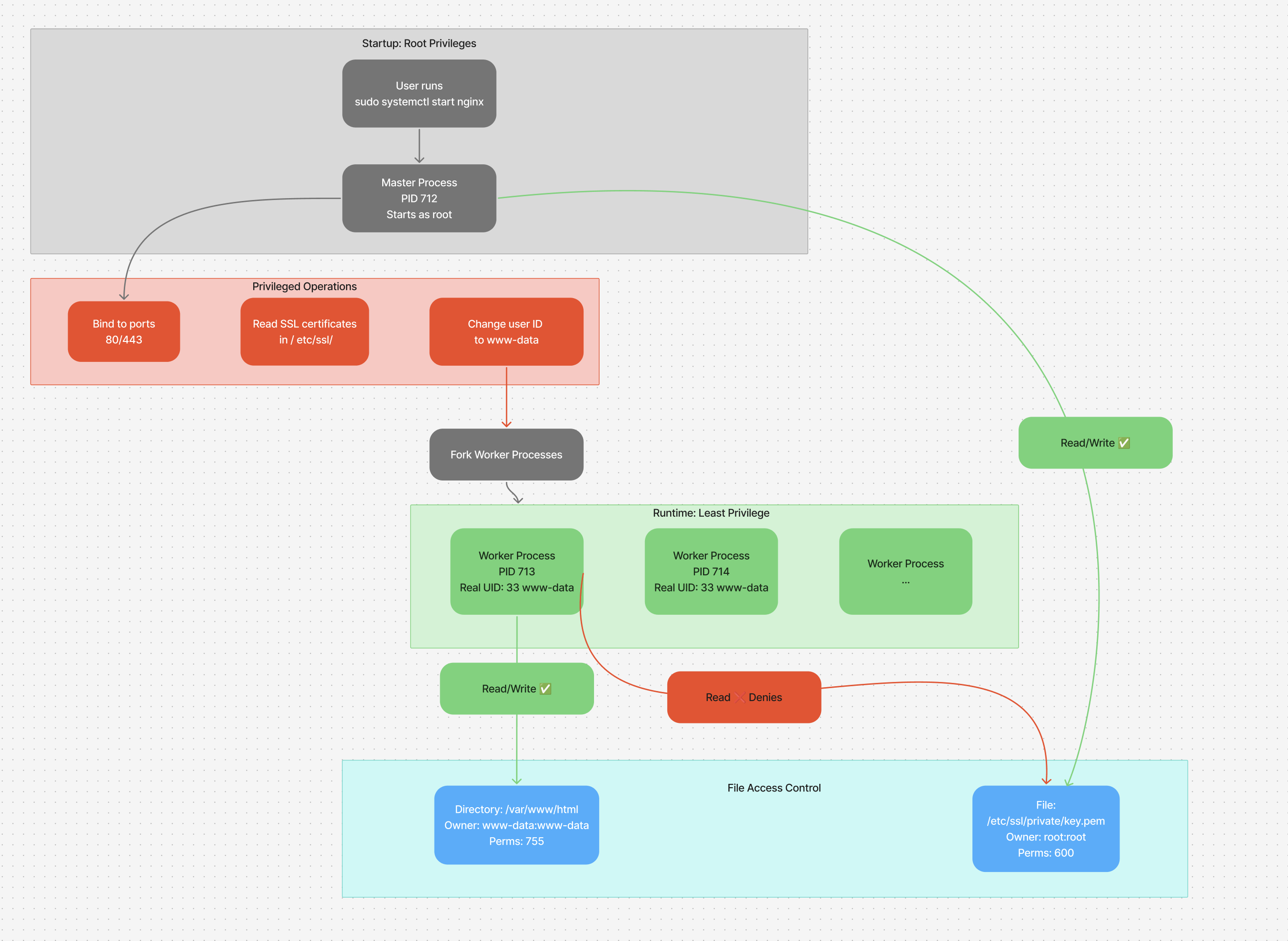
Nginx master and worker process
sudo ps aux | grep nginx
root         712  ... nginx: master process /usr/sbin/nginx -c /usr/local/www/nginx.conf
www-data     713  ... nginx: worker process
nginx starts as root (PID 712)
- The master prcess run as root to perform privilaged operations binding to port 80
hojat@base:~$ sudo cat /proc/712/status | grep -E "^Uid|^Gid"
Uid:	0	0	0	0 		# root (real, effective, saved, fs User IDs)
Gid:	0	0	0	0			# root (real, effective, saved, fs Group IDs)
Then it spawns worker processes as www-data (PID 713)
- This have **reduced privilege ** for security
- can't access root-owned files unless explicitly permitted.
hojat@base:~$ sudo cat /proc/713/status | grep -E "^Uid|^Gid"
Uid:	33	33	33	33		# www-data (real, effective, saved, fs User IDs)
Gid:	33	33	33	33		# www-data (real, effective, saved, fs Group IDs)
Why this Matters
- Example of privilege separation
- The master process
rootsets up things - The worker process
www-datahandle untrusted client input with minimal privileges - Even if one is exploited, damage is limited by UID isolation
Test scenario
cat upload.go
package main

import (
	"fmt"
	"io"
	"net/http"
	"os"
)

const uploadPath = "/var/www/html/upload"

func uploadHandler(w http.ResponseWriter, r *http.Request) {
	if r.Method == http.MethodGet {
		fmt.Fprint(w, `<!DOCTYPE html>
			<html lang="en">
			<head><meta charset="UTF-8"><title>Upload</title></head>
			<body>
			<form method="POST" enctype="multipart/form-data">
				<input type="file" name="file">
				<input type="submit">
			</form>
			</body>
			</html>`)
	}

	if r.Method == http.MethodPost {
		file, header, err := r.FormFile("file")
		if err != nil {
			http.Error(w, "Error reading file: "+err.Error(), http.StatusBadRequest)
			return
		}
		defer file.Close()

		dstPath := fmt.Sprintf("%s/%s", uploadPath, header.Filename)
		dst, err := os.Create(dstPath)
		if err != nil {
			http.Error(w, "Permission denied: "+err.Error(), http.StatusInternalServerError)
			return
		}
		defer dst.Close()

		_, err = io.Copy(dst, file)
		if err != nil {
			http.Error(w, "Failed to save file: "+err.Error(), http.StatusInternalServerError)
			return
		}

		fmt.Fprintf(w, "Upload successful: %s", dstPath)
	}
}

func main() {
	http.HandleFunc("/", uploadHandler)
	fmt.Println("Server started on :8080")
	http.ListenAndServe("0.0.0.0:8080", nil)
}
Build and run with root
root@base:/usr/local/bin# ls -la
total 18M
drwxr-xr-x  2 root  root  4.0K Jul 15 12:46 .
drwxr-xr-x 11 root  root  4.0K Jul 10 09:25 ..
-rw-rw-r--  1 hojat hojat 1.3K Jul 15 12:46 upload.go
-rwxr-xr-x  1 root  root  6.1M Jul 15 12:46 upload-server

root@base:/usr/local/bin# go build -o upload-server upload.go
root@base:/usr/local/bin# sudo -u www-data ./upload-server
Server started on :8080
www-data user dont have write access so it will fail
root@base:~# chown -R root /var/www/html/upload/
root@base:~# chmod 700 /var/www/html/upload/

# Upload will fail
Permission denied: open /var/www/html/upload/Juli - 2025.pdf: permission denied
Changing owner to www-data solved the problem
root@base:~# chown -R www-data /var/www/html/upload/
root@base:~# chmod 700 /var/www/html/upload/

Upload successful: /var/www/html/upload/Juli - 2025.pdf
Saved UID: The passwd Command
❯ ls -la /usr/bin/passwd
-rwsr-xr-x 1 root root 64152 May 30  2024 /usr/bin/passwd
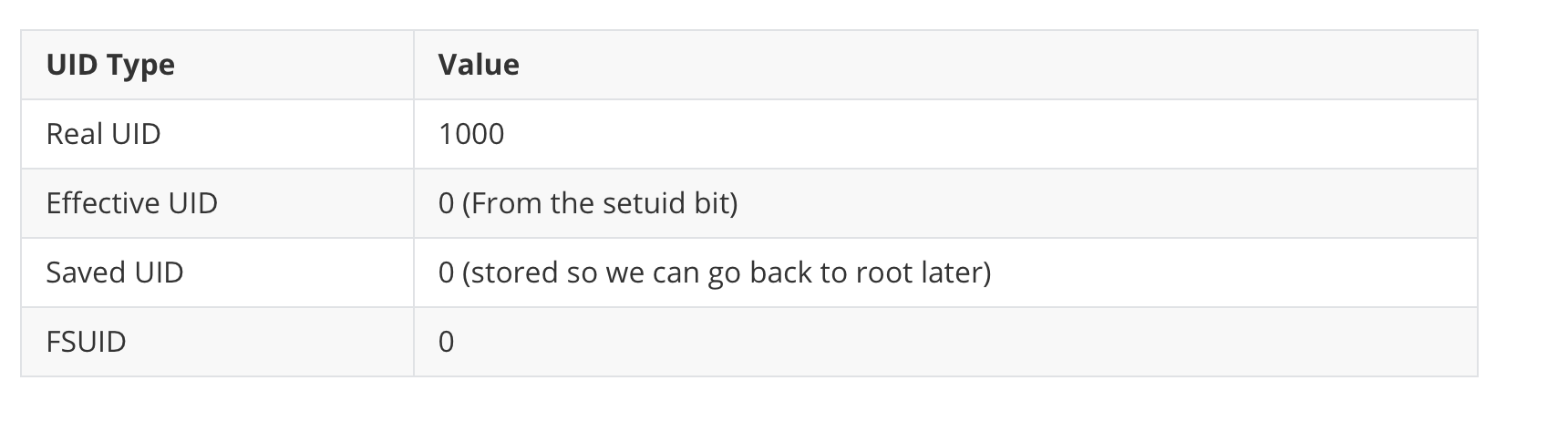
- The
sin-rwsmeans it's asetuidbinary. - When a normal user (UID: 1000) runs it:
Conclusion
Understanding the distinction between Real, Effective, Saved, and Filesystem UIDs is fundamental to mastering Linux security and system programming. This model allows Linux to:
- Elevate privileges securely (e.g.,
passwd,sudo). - Drop privileges for safety (e.g., Nginx, Apache).
- Implement robust privilege separation, minimizing the impact of a security breach.
By controlling how processes interact with the system's resources, Linux maintains a flexible and powerful security environment.
---
### 🔗 Read Next: [Dive Deeper into the Linux Kernel](https://hojat-gazestani.github.io/articles/Linux-Virtual-File-System)