Understanding Linux Special Permissions: SUID, SGID, and the Sticky Bit
Table of Contents
- Overview
- The SUID (Set User ID) Bit
- The SGID (Set Group ID) Bit
- The Sticky Bit
- How to Set These Permissions
- Numeric Notation Cheat Sheet
- Security Best Practices
🔔 Prerequisite Reading: This article covers special Linux permissions. Before diving in, ensure you understand how the kernel uses Real, Effective, Saved, and Filesystem UIDs to manage permissions and security for processe, please read our foundational guide: linux Read, Effective, saved, and Filesystem UID
Overview
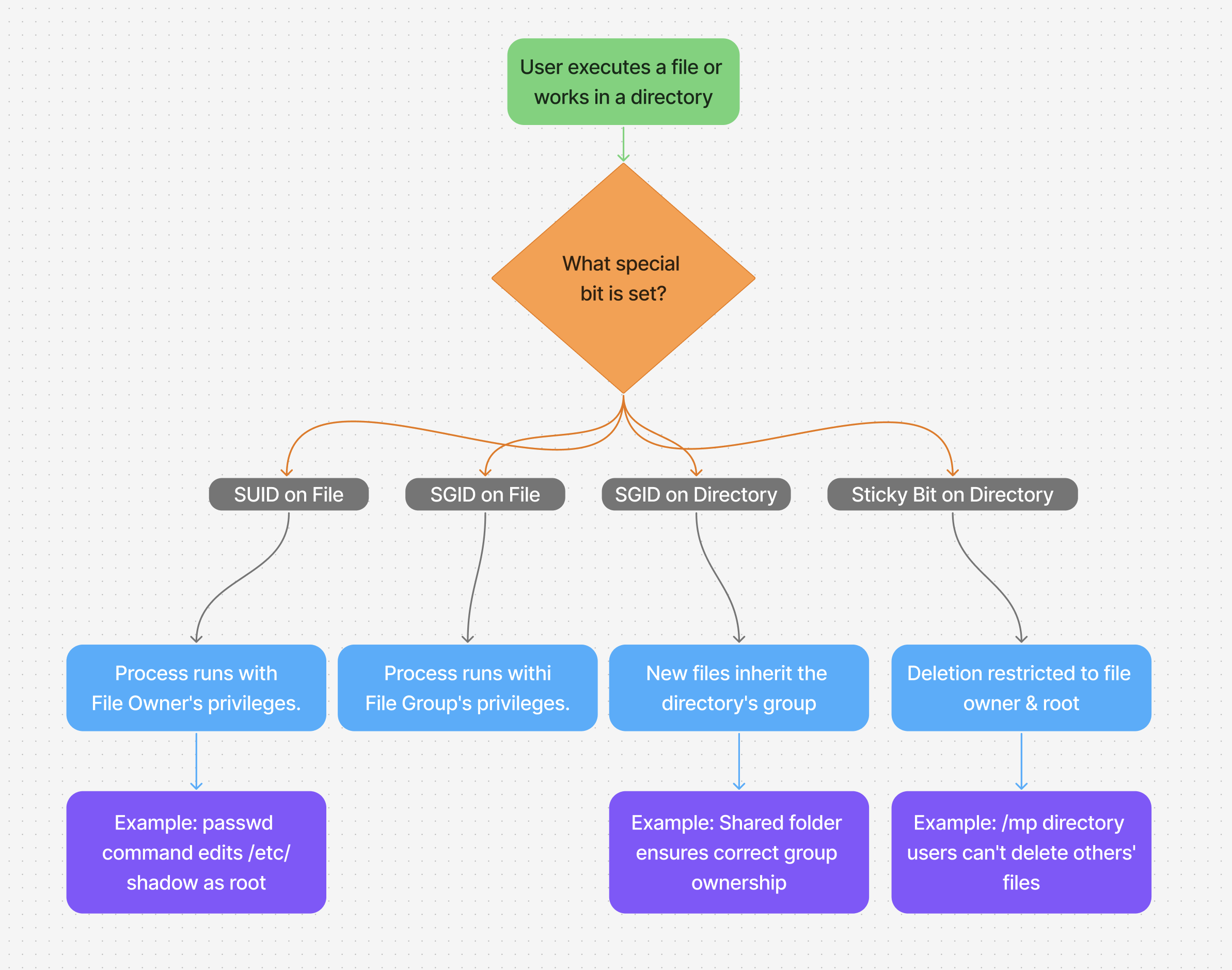
In linux SUID, GUID or (SGID), and sitcky bit are special permission bits used to control how files and directories behave, specially with respect to user/group privilege and deletion rules.
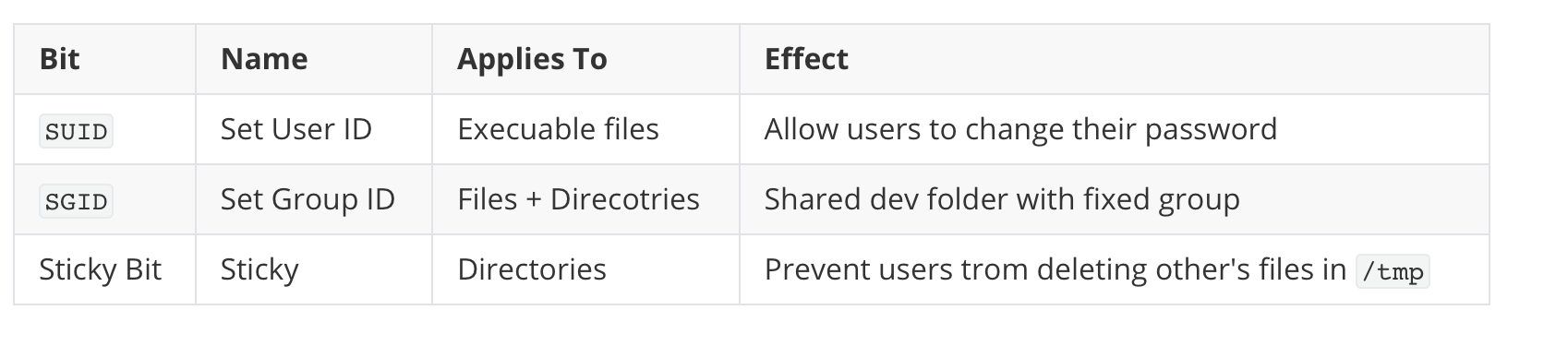
Summary Table
The SUID (Set User ID) Bit
When a file is executed, it runs with the file owner's privileges, not the user who runs it.
How it Works
It changes the effective UID and GID of the resulting process to the UID or GID of the file containing the program image rather than the UID and GID of the user that ran the command.
Example:
❯ ls -la /usr/bin/passwd
-rwsr-xr-x 1 root root 64152 May 30  2024 /usr/bin/passwd
-
The
sin-rwsmeans it's asetuidbinary is set. -
The owner is root, so anyone running passwd gets temporary root privileges to update the /etc/shadow file and change their password.
The SGID (Set Group ID) Bit
When a file is executed, it runs with the file owner's privileges, not the user who runs it.
📍 Applies to: Executable files
🔍 Example:
ls -l /usr/bin/passwd
-rwsr-xr-x 1 root root 54256 Jul 15 13:00 /usr/bin/passwd
sin place of owner'sx: SUID is set- Owner is
root, so anyone runningpasswdgets temporary root privileges too update their password
📍on files:
- Runs with **group's privileges **, not the user's
📍On Directories:
- new files/directories created inside inherit the group of the parent dir (not the user's group)
🔍 Example:
Setting SGID for a shared directory
# Set SGID on a shared directory
sudo chmod g+s /shared
New files inside will belong to developers group.
ls -ld /shared
drwxr-sr-x 2 root developers 4096 Jul 15 18:00 /shared
- The
sin the group execute field (r-s) indicates the SGID bit is set. - New files created in
/sharedwill automatically belong to thedevelopersgroup.
The Sticky Bit
In shared directories (e.g /tmp), prevents users from deleting other's files , even if they have write permission on the directory.
📍 Applies to: Directories
🔍 Example:
ls -ld /tmp
drwxrwxrwt 10 root root 4096 Jul 15 18:00 /tmp
- The
tin the others' execute field (rwt) means the sticky bit is set. - Without it, any user could delete any file in
/tmp. With the sticky bit, only the file owner (or root) can delete a file.
How to Set These Permissions
✅ SUID
chmod u+s file
chmod 4755 file
✅ SGID
chmod g+s file_or_dir
chmod 2755 file_or_dir
✅ Sticky Bit
chmod +t directory
chmod 1755 directory
Numeric Notation Cheat Sheet
The special permissions are added as a fourth digit before the standard permission octal.
Examples:
chmod 4755 file→ SUID + rwxr-xr-xchmod 2755 dir→ SGID + rwxr-sr-xchmod 1755 dir→ Sticky Bit + rwxr-xr-tchmod 6755 file→ SUID + SGID (4+2=6)
Security Best Practices
While powerful, these permissions can be a security risk if misconfigured.
- Use SUID/SGID Sparingly: Every SUID binary is a potential path to privilege escalation. Audit your system regularly with
find / -type f -perm /4000(SUID) andfind / -type f -perm /2000(SGID) to see what's set. - Prefer Groups over SUID: Often, giving a group write permission to a directory (with
chgrpandchmod g+w) is safer than setting SUID on a binary. - Ownership Matters: The effectiveness of SGID depends on correct directory and file ownership. Always double-check the group owner (
chgrp). - The Sticky Bit is Your Friend: Always set the sticky bit (
chmod +t) on world-writable directories like/tmpto prevent accidental or malicious file deletion.